
Product Release Update - October 2026: real-time climate alerts, NDVI for IRG-only plots and new Daisy answers

Four updates across the platform:
Real-Time Climate Alerts from Davis & iLeaf Weather Stations
NDVI Layer for Plots with Only IRG Sensors
Daisy Updates — Irrigation recommendation in hours
Daisy Updates — NDVI questions in Daisy chat
Feature 1 · Climate alerts
Real-Time Climate Alerts from Davis & iLeaf Weather Stations
Customers with a Davis or iLeaf weather station can now get real-time alerts on the climate conditions their station measures.

What it does.
Alert on key climate parameters such as temperature, humidity and radiation
Get notified in real time when conditions cross the limits the customer sets
Based on the customer’s own station, so the alert reflects conditions in their field, not a regional forecast
Why it matters. Climate events such as heat waves or long periods of high humidity can damage the crop within hours. With these alerts, growers learn about them as they happen and can respond right away, for example by adjusting irrigation during heat or watching disease risk when humidity stays high.
Who it’s for. It’s only available to customers who have a Davis or iLeaf weather station.
Feature 1b · Climate alerts — setup
Set the limits per station
Set above and under thresholds for each weather parameter, from the Configuration panel or straight from the weather card.
1. Open Configuration. Choose Climate Threshold Configuration.
Or use the pencil. On the station’s weather card.
2. Set above and under. Temperature, humidity, solar radiation, wind speed.
3. Turn on Push. In the app: Notifications, Climate tab.

Feature 2 · NDVI for IRG-only plots
NDVI Layer for Plots with Only IRG Sensors
Plots with only IRG (water) sensors used to be blocked from the NDVI layer. They now appear in the NDVI layer like any other plot.

What it does.
See NDVI imagery for plots that are monitored for irrigation only
Compare crop vigor across the farm, including plots that were missing from the NDVI view until now
Why it matters. Customers who monitor irrigation only can now see crop vigor from satellite alongside their irrigation data. That makes it easier to spot weak or uneven areas in the plot and check whether irrigation is reaching the whole plot.
Feature 3 · Daisy — irrigation hours
Irrigation recommendation in hours
When a user asks for this week’s recommended irrigation amount, Daisy now also gives it in irrigation hours, next to mm/inch.
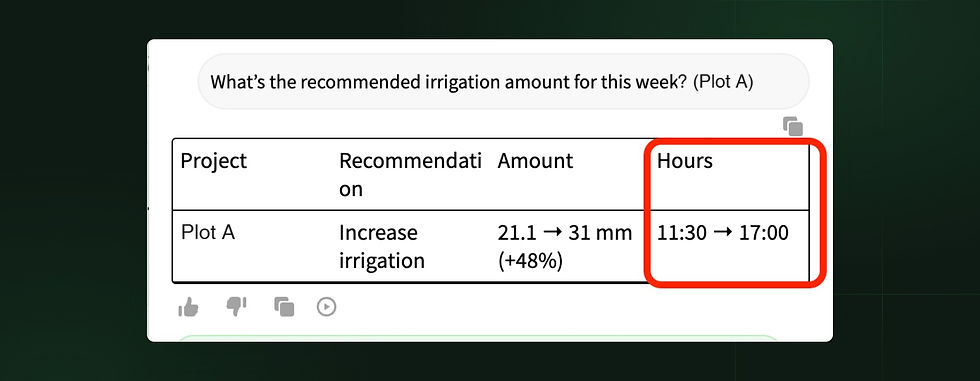
What it does.
Amount stays the main value; hours is added as an equivalent
Works in all supported languages (English, Hebrew, Spanish), on web and mobile
Why it matters. This was one of the most common requests in Daisy chat. Many irrigation teams schedule in hours, so they can now act on the recommendation directly without converting it themselves.
Feature 4 · Daisy — NDVI questions
NDVI questions in Daisy chat
Daisy can now answer questions about NDVI (satellite crop vigor) at plot and area level.
Try asking.
Latest image: “What does the latest NDVI image show?”
Trend: “What is the NDVI trend over the last month?”
Changes: “Has there been any recent change in NDVI?”
What Daisy does. Daisy explains what the NDVI values mean for crop vigor, so users don’t need to read the imagery themselves. If there’s no NDVI imagery for the requested plot or period, Daisy says so clearly.


Learning about network administration can save time when basic connection problems occur. Understanding where configuration options are located makes troubleshooting less intimidating and helps users avoid unnecessary changes. For specific scheduling or access controls, information about 10.0.0.0.1 piso wifi time can be useful when matched to the correct device documentation.