
Release Update (July 13): Smarter Daisy Recommendations, Mobile Updates & More

This month's release expands Daisy's capabilities and introduces several new features across Mobile, Planter, Frost, and the API.
New in Daisy
Daisy now proactively recommends whether to increase, decrease, or maintain irrigation for every project and explains the reasoning behind each recommendation. You can now:
View irrigation recommendations across an entire area
See project-level recommendations with detailed explanations
Switch seamlessly between agronomic and hydraulic insights in one unified Daisy
Also new in this release:
📱 Mobile
Compare hydraulic graphs directly from your phone
View the VPD graph alongside your plant and soil data
❄️ Frost
Davis Weather Station data is now available inside the Frost app, keeping all your frost-critical information in one place.
🌱 Planner
Stop all irrigation in an area with a single action
Automatically identify templates affected by configuration changes
Edit or delete irrigation plans after they've been sent (supported automation systems)
🔗 API - Two new datasets are now available for integration partners:
Hourly Root Zone Data
Climate Forecast Endpoint
“Should I adjust my irrigation?”
The question growers ask Daisy most, now answered proactively. Daisy 2.0 is an irrigation decision partner: for every block it recommends increase, decrease, or hold — and explains why. Agronomic and hydraulic, unified in a single Daisy.
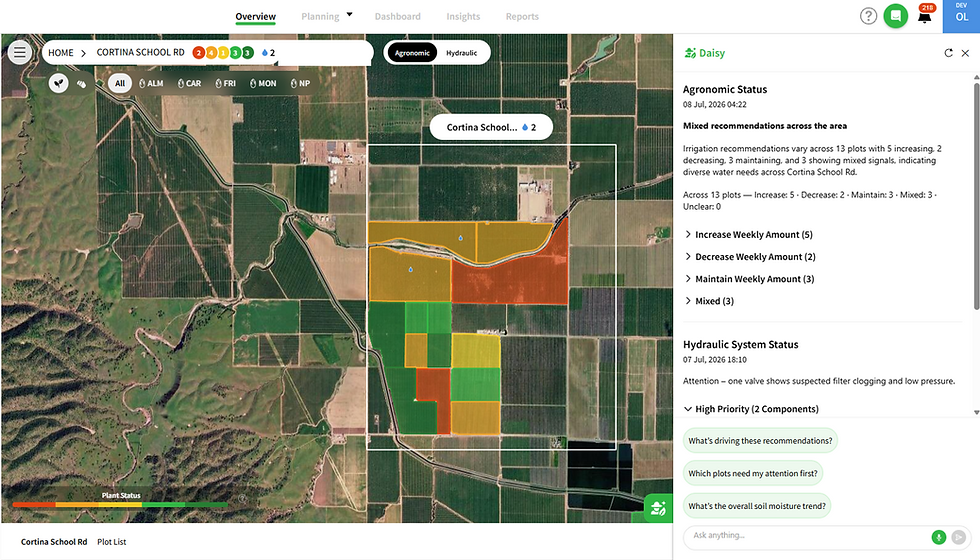
The whole farm at a glance -Area mode

Open Daisy on an area and it leads with what needs attention across the farm.
Recommendation Summary
See how many blocks should increase, decrease, or maintain irrigation this week, grouped into an easy-to-expand summary.
Hydraulic Status
View the hydraulic components that need attention, prioritized by high, medium, and low severity alongside the agronomic overview.
Why it matters
Get a complete picture of your farm in seconds, so you know where to focus first.
Who it's for
Farm managers • Agronomists
A recommendation for every project - Plot mode
Open a block and Daisy provides a clear recommendation for each project:

increase, decrease, or maintain irrigation, including whether to adjust the irrigation amount, frequency, or both.
Explain
Every recommendation includes a clear explanation based on supply vs. demand, soil moisture trends, time to the stress line, and the weather forecast.
Why it matters
Get the answer growers ask most—delivered proactively for every project.
Who it's for
Growers • Irrigators
Decrease and maintain examples:


One Daisy. One chat.
Agronomic and hydraulic insights now work together in a single Daisy experience.

How you use it
Ask Daisy anything in your own words or start with suggested questions. Move seamlessly between the whole farm and individual projects within the same conversation.
Why it matters
Agronomic and hydraulic intelligence come together in one advisor, providing a complete picture across every sensor.
Who it's for
All Daisy users
Compare To on mobile graphs
Compare hydraulic graphs directly from your phone by displaying another

component from the same area on the same chart.
What it is
The web Compare To capability is now available in the mobile app.
What it does
Overlay another hydraulic component on the same graph for quick comparison while you're in the field.
Why it matters
Provides full parity with the web experience for growers and field teams working on mobile.
Who it's for
Field teams • Irrigators
VPD graph on mobile
The Vapor Pressure Deficit (VPD) graph is now available in the mobile app.

What it is
A new VPD graph has been added to the mobile project view.
Why it matters
Track atmospheric water demand alongside your plant and soil measurements from anywhere.
Who it's for
Growers • Agronomists
Davis station data in the Frost app
Customers with Davis weather stations can now view station data directly inside

the Frost app.
What it does
Displays Davis weather readings alongside your frost monitoring tools within the same interface.
Why it matters
Access all frost-critical information from one place during frost events—without switching between apps.
Who it's for
Frost program growers • Davis station owners
Project metadata on the crop icon
The crop icon now displays additional project information.

What it does
Hover over the crop icon to instantly see the crop, variety, and planting year.
Why it matters
Identify projects more quickly without leaving the current screen.
Availability
Web app
Two new datasets for partners
The Phytech API now includes richer root-zone data and a new climate forecast endpoint.
Hourly Root Zone Data
Access hourly root-zone information including saturation, stress line, and safety values in both raw and normalized formats.
Climate Forecast Endpoint
Retrieve forecasted climate data for the coming seven days, including maximum temperature, ET₀, ETc, and humidity.
Why it matters
Enable richer integrations and support more advanced irrigation planning based on Phytech data.
Who it's for
Integration partners • API customers
Stop All Irrigation
Stop every active and scheduled irrigation event across an area with a single

action.
How it works
Select Stop All Irrigation from the Planter menu and confirm. All active, scheduled, and cooling irrigations are paused until you choose to resume them.
Why it matters
React immediately to leaks, equipment failures, pest events, or over-irrigation with one command.
Who it's for
Irrigators • Farm managers
Template resilience to configuration changes
Planter now detects when valve or pump configuration changes affect irrigation

templates.
How it works
Templates linked to modified valves or pumps are automatically flagged, allowing you to review and correct them before the next irrigation.
Why it matters
Prevent failed irrigations by identifying broken templates before they become operational issues.
Who it's for
Irrigators • Farm managers
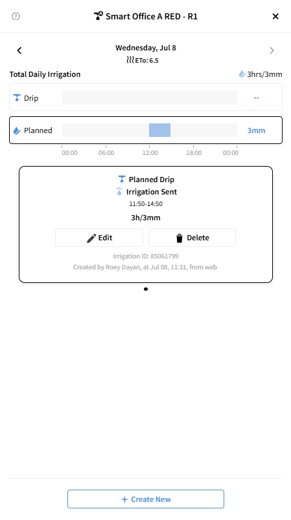
Delete or edit a plan after "Irrigation Sent"
Edit or delete irrigation plans even after they have been sent.

How it works
Plans with Sending Irrigation or Irrigation Sent status can now be edited or deleted directly from both the Plant app and the desktop application.
Why it matters
Adjust or cancel irrigation plans quickly without returning to the legacy Planner.
Availability
Available for Smart Automation systems. WiseConn support will be added in a future release.


The irrigation recommendations for every block sound really useful, especially the explanations behind them. I like that they added the VPD graph to mobile too, that makes checking things on the go much easier. Krillion seems like the kind of tool that could save me a lot of time this season.
The appeal of this burnt cheesecake style lies in its contrast between the dark, caramelized exterior and the soft, almost molten center. A thorough explanation of the Basque cheesecake method covers the minimal flour and simple technique that make it so distinctive.
Businesses considering SEO Toronto Pro may want to prioritize local SEO when customers typically search for nearby companies before requesting a quote or making contact.
The latest Daisy update, particularly the mobile enhancements for comparing hydraulic graphs directly from your phone, really highlights the importance of reliable connectivity for field teams. When you're out in the field, making crucial decisions based on real-time data, having a consistent connection isn't just a convenience – it's essential for productivity, and as part of the team at Cellesim, that's something we're always focused on. For professionals managing operations, whether domestically or even traveling to places like South America for agricultural insights, ensuring seamless access to data, such as with an https://cellesim.com/da/esim-brazil, can make all the difference in keeping their tools and teams effective.
I was just telling my irrigation guy last week we need something like this. The recommendation summary for the whole farm is exactly what I've been looking for. I've been using Meowdoku to track my blocks and now this makes it way easier to see what needs attention first.