
Product Update (02 Feb.26): One App. One Flow

In today’s version, we are excited to introduce a major update: the full integration of the Planner app within the Plant app.
Please note that the standalone Planner app will continue to function as usual until further notice.
We highly recommend watching this video, with a full walkthrough and explanation.
Key Highlights:
Agronomic vs. Hydraulic modes: A new toggle on the top bar allows users to switch between Hydraulic and Agronomic modes. This affects the three main pages (Map, List, and Plot), shifting the features and perspective accordingly.
Planner Functionality: The List view under the "Hydraulic Mode" now operates with the full capabilities of the Planner.
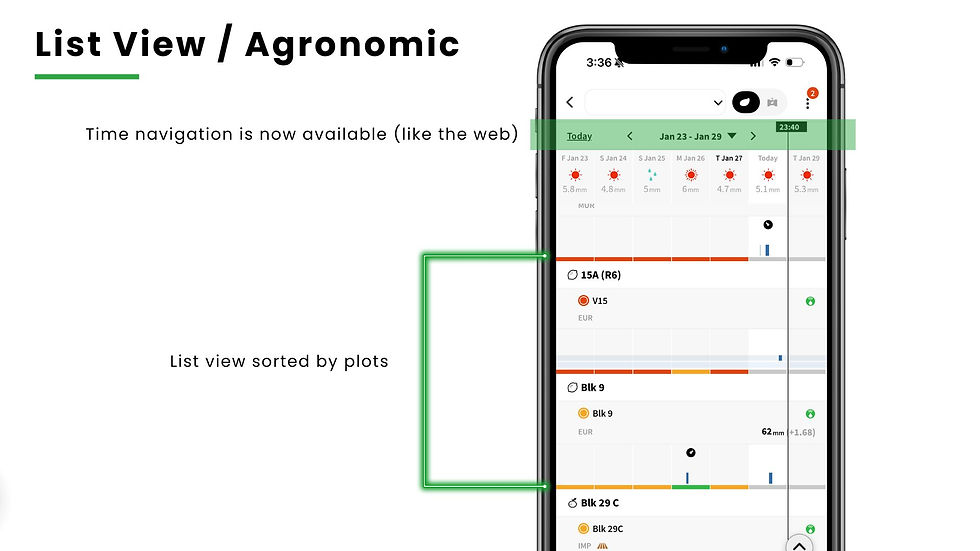
Time Navigation: Users can now navigate back in time on the Plot and List pages (so basically, seeing graphs or irrigation data not only for the current week), a feature previously only available on the web application.
Enhanced UX: We’ve implemented several minor UX improvements as a result of this integration (details in the video/slides).
Customization: New options in the Settings page now allow users to choose their preferred default page and mode when opening the app.
See the Screenshots or watch the walkthrough to make the most out of this integration:



Hydraulics - Mobile apps - add hydraulic configurations for components
Other important improvement is this current release that you can now configure hydraulic component settings directly from the mobile apps — Plant, Planner, and Pivot. See the screen shots:


If anyone likes skill-based browser games, eggy car is worth checking out. The hills get much harder the farther you go.
Dinosaur Game ’s charm comes from its simplicity and accessibility, offering a fun distraction that quickly becomes a competitive challenge as players try to beat their own records.
I found your insights on the integration of workflows quite compelling! How do you envision this enhanced flow impacting user productivity, Geometry Dash Lite? I'd love to hear more about any specific feedback you've received so far.
Nice to see this kind of integration. Having the Planner fully inside the Plant app sounds like it could make daily workflows much smoother and reduce the need to jump between tools. Updates like this usually save a lot of time once you get used to the new flow. I’m curious to watch the walkthrough and see how everything connects in practice. Solutions like KDI Office Technology show how unified systems can really improve productivity and organization.