
Another Big Update (16 March 26): Daisy Hydraulic 2.0 - Smarter. Deeper

Our big Release Update (March 16) is live, and the highlight is a major step forward for Daisy.
We’re launching Daisy Hydraulic 2.0 - a significant upgrade to our hydraulic AI capabilities. For users, this means:
Smarter hydraulic summaries that prioritize the valves that need attention first
One-click navigation from alerts directly to the valve investigation
A much more powerful Daisy chat, capable of answering deeper operational questions based on irrigation events, pressure data, and alert history
In short: faster diagnosis and faster action when managing irrigation systems.
Our goal: Daisy as the intelligent control center for your entire hydraulic system.
Additional features in this release
View Climate Station Data from Web Climate Layer - access and export detailed climate station data directly from the map
Frost Alerts: Phone Calls Per Plot - receive phone call alerts when specific plots cross frost thresholds
Vertical Gridlines on Web & Mobile Graphs - improved readability for soil moisture and fruit graphs
Daisy Hydraulic 2.0 is Here
The hydraulic summary now classifies alerts into clear priority levels:
🔴 Attention Required
🟠 Important
🟢 Good to Know
The AI prioritization is based on:
Alert type
Frequency
Recurrence patterns
Active or Resolved
Additional operational parameters
This ensures that the most impactful valves are surfaced first.


Daisy Hydraulic 2.0 is Here - A Significantly More Powerful Chat
Daisy Hydraulic Chat has been dramatically upgraded. It now has structured access to hydraulic database information for every valve, including:
Irrigation events
Pressure data
Water quantities
Alert history
Timing information
Comparative performance data
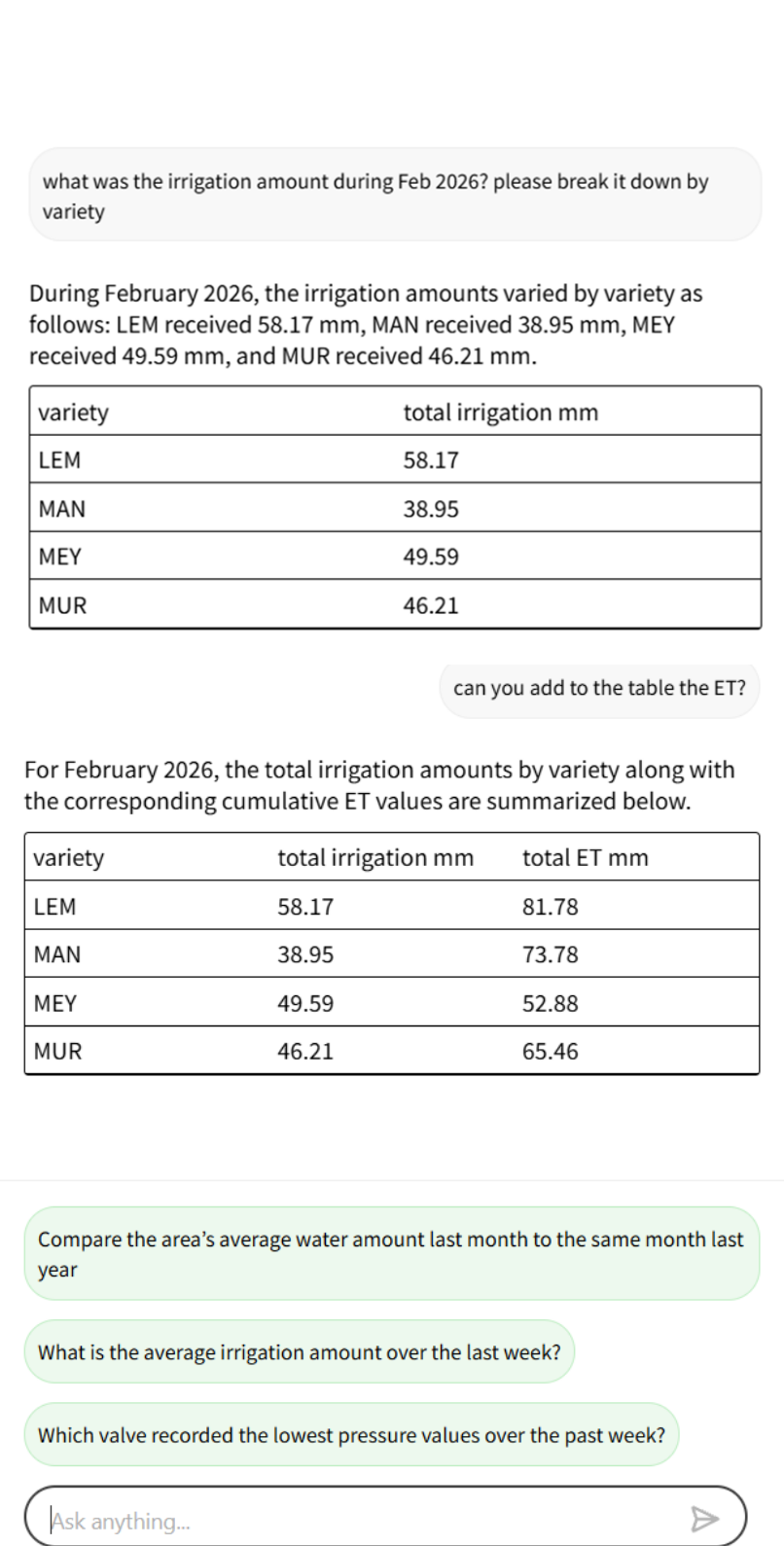
You can now ask deeper, more complex operational questions — and receive detailed, data-driven answers.
Examples below:
3 built-in questions
Allows users to ask questions in natural language
Includes analytical capabilities

Daisy Hydraulic 2.0 is Here - What’s Next
We will continue expanding Daisy’s hydraulic intelligence. Coming next quarter:
Summaries and Chat abilities for additional hydraulic components (Pumps, Filters, Ponds, Fert tanks, etc.)
In parallel, we are expanding Daisy’s chat capabilities beyond hydraulics.
Daisy will progressively be able to answer questions across Plant, Fruit, Soil and Climate (Already today, Daisy provides strong capabilities in several of these domains — and this will continue to grow.)
Our goal: Daisy as the intelligent control center for your entire hydraulic system.
View Climate Station Data from Web Climate Layer
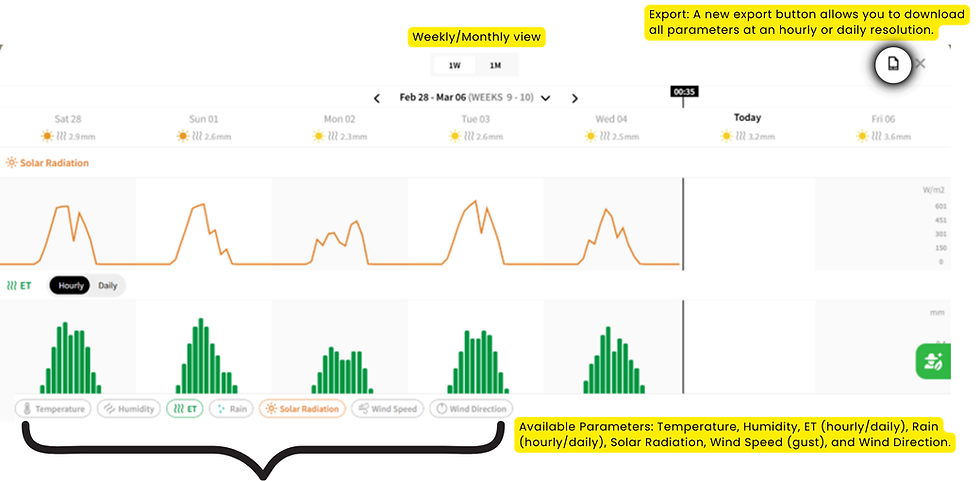
Data from climate stations is now available for viewing and downloading directly from the climate layer on Phytech’s web interface.
Once you switch to the climate layer, the Climate Station icon will appear on the map. Clicking it opens the dedicated station page. In this view:
Monthly View: Provides data at an hourly resolution.
Weekly View: Provides data at a 15-minute resolution (for stations with a subscription supporting this frequency). In this view, ET and Rain data are available in both daily and hourly resolutions.
Available Parameters: Temperature, Humidity, ET (hourly/daily), Rain (hourly/daily), Solar Radiation, Wind Speed (gust), and Wind Direction.
Export: A new export button allows you to download all parameters at an hourly or daily resolution.
Frost Alerts: Phone Calls Per Plot
What’s New
Previously, the Frost application only generated one phone call for the very first alert a user received each night, regardless of the plot or area. Subsequent alerts from other plots only triggered SMS or Push notifications.
With this update, users can select specific plots to trigger a phone call alert every time they cross a threshold, in addition to the standard "first alert per night" setting.
How It Works
On the main settings page, choose to get push and/or SMS per plot, and the “first alert per night” .
In the area settings page, where alerts threshold per plot are set, there is a “Phone call” icon.
Pressing this icon will enable getting a phone call alerts when the plot crossed its’ defined frost threshold.

Vertical Gridlines: Web and Mobile Graphs
Vertical gridlines have been added to the Soil Moisture and Fruit graphs on both the web and mobile platforms to improve readability and data alignment.




For readers researching 1.0.0.0.1, a straightforward explanation can be very helpful. Well-organized content gives users useful background, explains unfamiliar concepts, and makes it easier to follow the topic even if they have limited experience with network settings.
Wow, I am quite excited about the Daisy Hydraulic 2.0 block blast update! Technology seems to be evolving on a daily basis. Finding ways to improve efficiency is something I enjoy seeing in technology since it has a significant impact on day-to-day operations.
I appreciate how clearly 10.0.0.1 was explained. It is much easier to troubleshoot a home network when the basic router settings are explained in simple language.
This gave me a completely fresh perspective I was not expecting. Mr Racer gave me a completely new appreciation for what browser racing games can be when they are done properly.
This gave me a completely fresh perspective I was not expecting. Eggy Car gave me a completely new appreciation for what browser games can be when they are done properly.